
If you have made profits from Bitcoin and want to diversify into other cryptocurrencies, buying NEO on Bittrex is a straightforward process.
In this post, you will learn exactly how to trade Bitcoin for NEO on the Bittrex exchange.
Whether you are reallocating gains or building a diversified crypto portfolio, this tutorial will walk you through the steps clearly and efficiently.
What Is NEO?

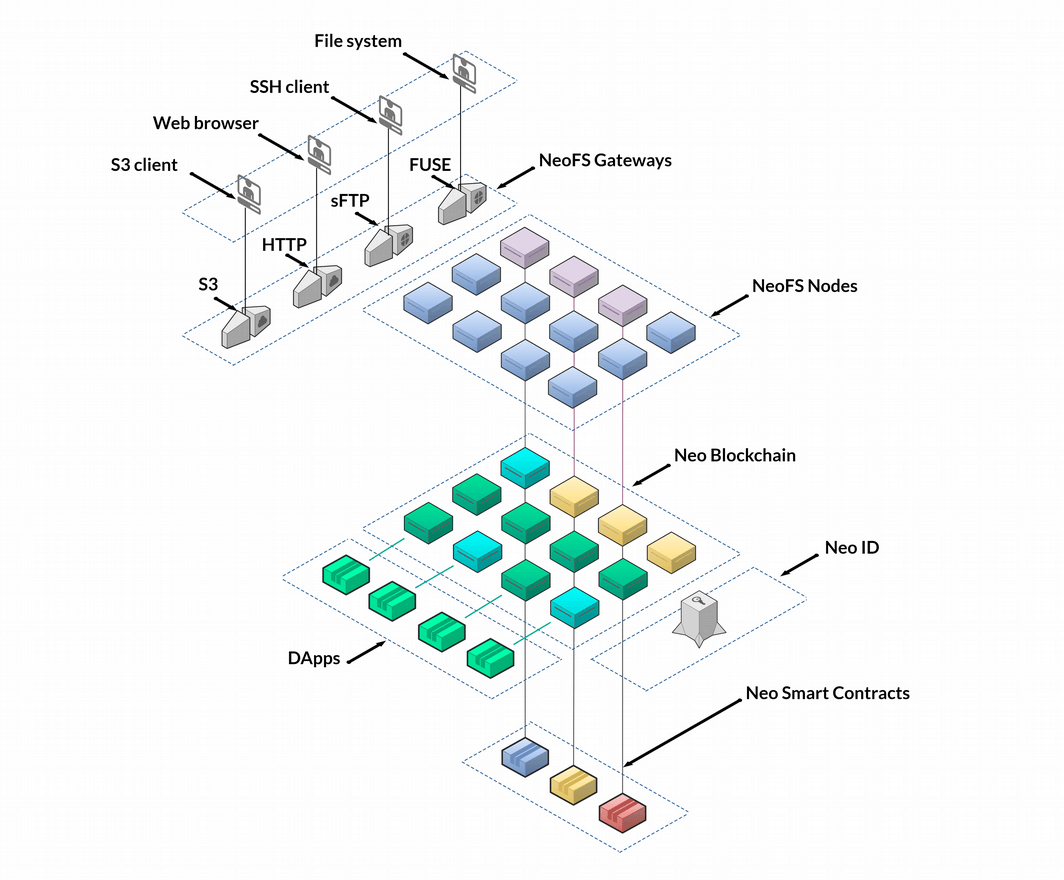
NEO is often referred to as the Chinese Ethereum because it focuses on building a smart economy powered by digital assets, digital identity, and smart contracts.
Investors commonly buy NEO to:
- Diversify beyond Bitcoin
- Gain exposure to smart contract platforms
- Participate in the broader blockchain ecosystem
Why Use Bittrex to Buy NEO?

Bittrex is a well known cryptocurrency exchange that allows users to trade Bitcoin for altcoins such as NEO.
It provides:
- A clean trading interface
- Transparent order books
- Competitive liquidity
- Secure trading environment
Before you begin, make sure:
- Your Bittrex account is verified
- You have Bitcoin deposited into your account
Step 1: Go to the Markets Page
Once logged into Bittrex:
- Navigate to the Markets section.
- Since you are trading Bitcoin for NEO, select the Bitcoin market.
- Scroll through the list until you find NEO.
- Click on the NEO trading pair.
You will now be on the NEO trading page.
Step 2: Understand the Order Book
Before placing your order, look at the order book.
You will see:
- Sell orders listed at the top
- Buy orders listed below
- The bid ask spread between them
The bid ask spread represents the difference between what buyers are willing to pay and what sellers are asking.
If you want a faster transaction, choose a price between the buy and sell prices.
Step 3: Enter Your Buy Order
Let us assume:
- You want to sell 0.02 Bitcoin
- The current NEO price is around 0.0087 BTC
In the Buy NEO section:
- Enter the price, for example 0.0087 BTC
- Enter the amount of Bitcoin you want to spend
- The system will calculate how much NEO you will receive
At 0.0087 BTC, 0.02 Bitcoin would net approximately 2.29 NEO.
Review the order carefully before submitting.
Step 4: Confirm Your Purchase
Click Buy NEO.
Once the transaction is confirmed and matched in the market:
- Your Bitcoin balance decreases
- Your NEO balance increases
- The trade is complete
You have successfully purchased NEO using Bitcoin on Bittrex.
Market Order vs Limit Order
When buying NEO on Bittrex, you can choose between:
Limit Order
- You set the exact price
- May take longer to fill
- More control over execution
Market Order
- Executes immediately
- Accepts current market price
- Faster but slightly less control
For quick transactions, placing a limit order near the bid ask spread is often effective.
Risk Management Tips
When diversifying from Bitcoin into NEO or other altcoins:
- Never invest more than you can afford to lose
- Consider spreading risk across multiple assets
- Monitor liquidity and trading volume
- Secure your holdings with a reliable wallet
Cryptocurrency markets are volatile. Diversification can reduce concentration risk but does not eliminate overall market risk.
Final Thoughts
Buying NEO on Bittrex using Bitcoin is a simple process:
- Deposit Bitcoin
- Navigate to the NEO market
- Review the order book
- Place your buy order
- Confirm the trade
By understanding the order book and the bid ask spread, you can execute trades more efficiently and strategically.
Diversifying from Bitcoin into projects like NEO may help broaden your exposure to the blockchain ecosystem, but always conduct your own research before investing.




Leave A Comment