Mining Zcash can be a straightforward process if you have already mined other cryptocurrencies.
In this post, you will learn how to download and configure a Zcash miner, connect to a mining pool, send rewards to your exchange wallet, and calculate whether mining Zcash is actually profitable for you.
If you are building long term crypto skills, this practical walkthrough will help you understand both the technical setup and the economics behind Zcash mining.
What You Need Before Mining Zcash
Before getting started, make sure you have:
- A dedicated mining PC with a strong GPU
- A Zcash wallet address
- Access to a mining pool
- Electricity cost details for profitability calculations
For this guide, we will use:
- SRB Miner software
- NanoPool mining pool
- Kraken exchange wallet
- CoinWarz mining calculator
Step 1: Download and Install SRB Miner
To mine Zcash, search for SRB Miner 5.5.5 and download the Windows version.
The file will be compressed in a zip format.
Installation Process
- Download the zipped file.
- Extract all files to your mining PC.
- Create a new folder, for example:
Zcash Miner. - Move all extracted files into that folder.
Once extracted, open the folder and locate the configuration file.
Step 2: Configure the Mining Pool
Right click the configuration file and select Edit.
Instead of using a configuration utility, we will manually modify the file.
Pool Configuration
We will use NanoPool.
- Visit nanopool.org
- Select Zcash
- Choose the server closest to your location
- Copy the pool address and port
Paste the correct pool URL and port into your configuration file.
Step 3: Add Your Zcash Wallet Address
To receive mining rewards, you must provide a public Zcash address.
You can generate one on Kraken:
- Log in to Kraken
- Navigate to Funding
- Select Zcash
- Generate or copy your public address
Paste this address into your miner configuration file.
This tells the mining pool where to send your Zcash rewards.
Save the file.
Step 4: Run the Miner
Double click the miner to start mining.
You should see:
- Hash rate starting around 340
- Gradually increasing to 400 or higher
For example, with an AMD Radeon RX Vega 64, expected performance is:
- Hash rate: 425 Sol per second
- Power usage: 295 watts
These numbers are important for profitability calculations.
Step 5: Calculate Zcash Mining Profitability
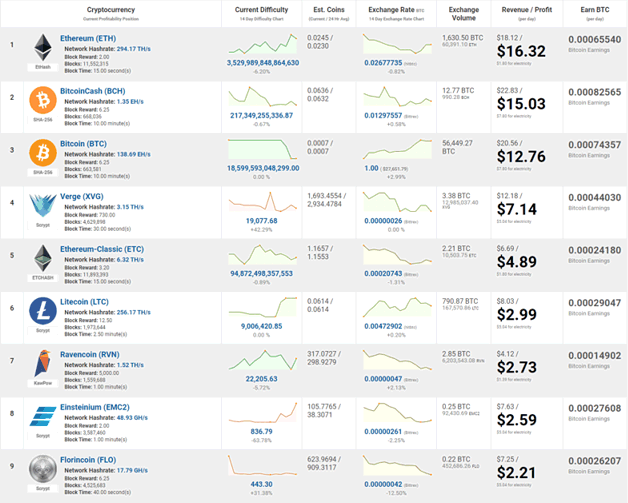
Before committing long term, check whether mining is worth it using CoinWarz.
Example Inputs
- Hash rate: 420
- Power consumption: 295 watts
- Pool fee: 1 percent
- Hardware cost: 900 dollars
- Electricity cost: 0.10 dollars per kWh
At 10 cents per kWh, you could lose approximately 13 dollars per year and never break even.
If electricity costs drop to 0.08 dollars per kWh, profitability improves slightly to around 38 to 39 dollars per year.
The key takeaway is simple:
Electricity cost determines everything.
If power is expensive in your region, mining Zcash may not be worth it.
Step 6: Monitor Your Mining Activity
After your miner runs for some time:
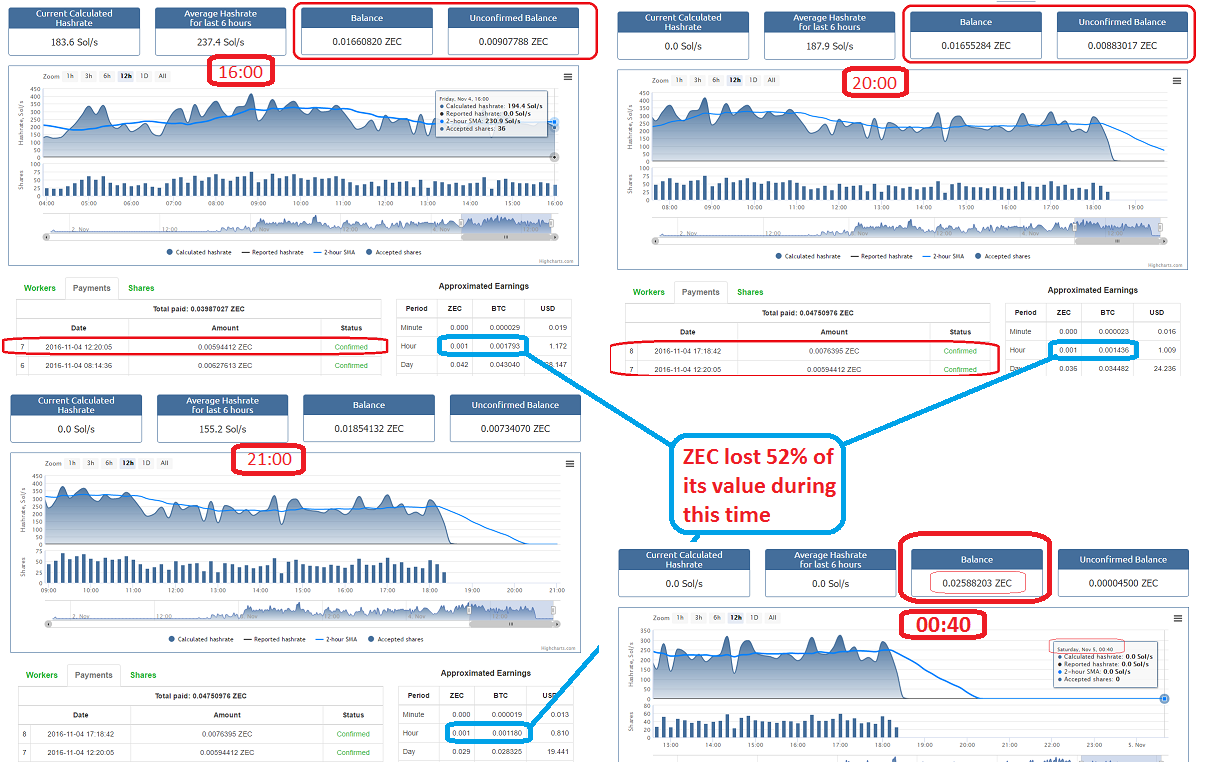
- Visit NanoPool
- Enter your Zcash wallet address
- Check your statistics
You may see:
- Small mined balances
- Worker status
- Hash rate data
- Payment history
Sometimes the pool may display Offline temporarily even if you are mining. It can take time for updates to reflect.
Once you accumulate enough Zcash, rewards are automatically deposited into your Kraken wallet.
Is Mining Zcash Worth It?
Mining Zcash depends on:
- GPU efficiency
- Electricity cost
- Zcash market price
- Hardware depreciation
In many cases, miners shift toward other coins like Ethereum when profitability is stronger.
If your electricity is cheap and your GPU is efficient, Zcash mining can generate modest returns.
If not, buying Zcash directly on an exchange may be more efficient than mining it.
Final Thoughts
Mining Zcash is technically simple if you have already mined other cryptocurrencies:
- Download the miner
- Configure NanoPool
- Add your wallet address
- Run the miner
- Check profitability
However, always calculate expected returns before investing time and hardware resources.
Crypto mining is a numbers game. If the math does not work in your favor, discipline is more important than emotion.
If you have questions about mining Zcash or optimizing GPU performance, continue building your framework and refine your strategy.



Leave A Comment